Coquettes 9 Bows Canva Frame Templates for Creative Projects
Every designer knows the struggle of finding the perfect visual anchor for a layout. You have the text, the color palette, and the concept, but the composition feels incomplete without a structured element to hold it together. The Coquettes 9 Bows Canva Frame Templates offer a specific solution to this common creative hurdle. This isn't just another set of static borders; it is a versatile digital asset designed to give your projects a distinct, polished structure. These templates provide a foundation upon which you can build entirely original backgrounds, digital papers, and intricate patterns, all within the accessible Canva environment.
Understanding the Visual Style and Application
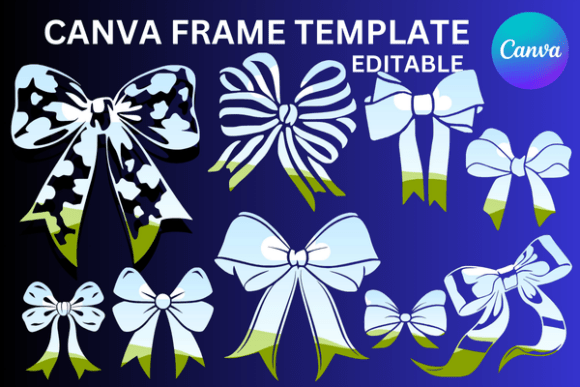
The Coquettes collection is defined by its playful yet sophisticated aesthetic. The "bows" element introduces a touch of whimsy and elegance, making these frames ideal for projects that aim for a charming, feminine, or celebratory tone. Think beyond simple photo borders. These frames are designed as transparent layers, which is a critical feature for any modern design workflow. This transparency allows you to layer them over any color, texture, or existing design without the hassle of clashing backgrounds. It makes them incredibly useful for creating cohesive digital paper patterns or as a standout feature in a social media graphic.
Practical application is where this asset truly shines. The file you receive is a PDF containing a link to nine custom-made Canva templates. The generous 5000×5000 pixel resolution provides a substantial canvas for high-quality print projects like posters, invitations, or product packaging. Need a smaller size for a web banner or a larger one for a wall decal? The template is fully scalable. You can reduce or increase the dimensions to suit your specific needs without losing clarity, a common limitation with raster-based image files. This flexibility is paramount for entrepreneurs and small business owners who need to maintain brand consistency across diverse media, from a tiny favicon to a large-format trade show display.
Integrating Frames into Your Design Workflow
For the content creator or marketer, time is a valuable resource. The drag-and-drop functionality of these Canva frame templates streamlines the design process significantly. Instead of manually drawing vector paths or struggling with complex software, you can focus on the creative vision. Imagine you are a blogger designing a series of Pinterest pins. Using the Coquettes frames, you can quickly establish a recognizable visual system. One pin might use a frame to highlight a key quote, while another uses it to create a border for a product shot. This consistency builds brand recognition and gives your content a professional, curated feel that audiences trust.
It is important to clarify what this product is not. This is an editable Canva frame template, not a PNG or SVG file. This distinction is crucial for your planning. While a PNG offers a static image, a Canva template is an interactive design element. You have the creative freedom to change its color, apply effects, or combine it with other Canva elements to forge something new. This makes it a dynamic part of your design toolkit rather than a one-time-use graphic. For crafters and hobbyists, this means the possibilities for personalization are nearly endless. You can create custom stationery, party decorations, or digital scrapbooking elements that feel uniquely yours.
Practical Guidance for Choosing and Using the Templates
Evaluating whether the Coquettes 9 Bows Canva Frame Templates fit your project requires a simple assessment of your goals. Consider the overall mood you wish to convey. The bow motif lends itself beautifully to wedding invitations, baby shower announcements, boutique branding, or any project where a sense of delight and detail is desired. If your brand identity is minimalist and stark, these frames might serve best as accent pieces rather than dominant features. Always test how the frame interacts with your chosen typefaces. A delicate script font might pair beautifully within the curves of a bow frame, while a strong sans serif could provide a pleasing contrast that enhances readability.
When you open the templates in Canva, take a moment to explore the nine variations. Observe the different styles of bows and the shapes of the frames themselves. Some may be more ornate, others more geometric. This variety allows you to select the perfect match for different applications within the same project or campaign. For instance, a more elaborate frame could be used for a hero image on a website, while a simpler variation works for internal page headers or email graphics. Remember, the goal is to use these design assets to enhance your message, not overwhelm it. The frame should guide the viewer's eye, creating a clear visual hierarchy that makes your content more engaging and easier to consume.
In the realm of modern typography and design, having reliable, flexible assets is non-negotiable. The Coquettes 9 Bows Canva Frame Templates serve as a practical example of how a single resource can influence multiple aspects of a project. They contribute to a cohesive brand identity, improve the professionalism of your output, and save valuable creative time. By understanding their capabilities—from scalable sizing to transparent layering—you can leverage them to produce work that stands out. Whether you are crafting a social media campaign, designing product packaging, or personalizing a gift, these templates provide a structured yet creative starting point. They empower you to build original backgrounds and patterns with confidence, ensuring your final design is both beautiful and functionally sound.