Mastering iPhone 16 Case Design: Canva Editable Templates
The release of a new iPhone generation creates an immediate, high-stakes window for designers and entrepreneurs. For the iPhone 16 series, the opportunity is not just in the device itself, but in the ecosystem of accessories that surrounds it. For creators in the custom merchandise space, the challenge has always been balancing speed with precision. You need to get designs to market the moment the phones ship, but you cannot afford the costly mistake of misaligned camera cutouts or button placements. This is where a professional, pre-measured asset becomes invaluable. We are looking at the iPhone 16 Series Phone Case Templates, a comprehensive design kit built specifically for Canva users who demand accuracy without the steep learning curve of complex vector software.
The Architecture of Precision: Why Measurements Matter
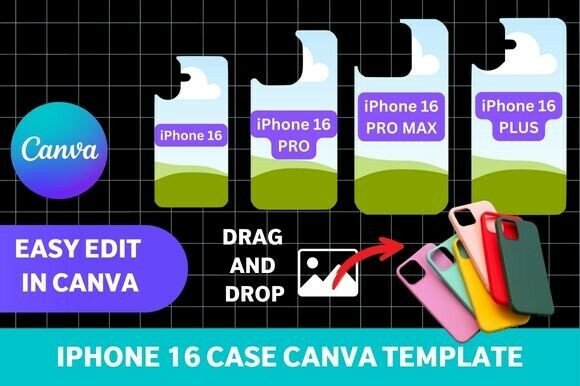
In the world of custom phone accessories, visual appeal is secondary to functional accuracy. A customer will forgive a slightly muted color palette, but they will return a case that blocks their camera lens or makes the volume buttons impossible to press. The iPhone 16 Series Phone Case Templates addresses this core requirement through meticulous engineering. Unlike generic mockups that merely approximate the shape of a phone, these templates feature accurate cutouts for camera and buttons.
This includes the distinct dimensions for the entire lineup: the standard iPhone 16, the larger 16 Plus, the professional-grade 16 Pro, and the massive 16 Pro Max. For a designer, this means you are working with a canvas that mirrors the physical product exactly. When you design a pattern that flows around the camera island or place a logo near the side button, you are doing so with the confidence that the final printed product will look exactly as it does on your screen. This level of precision is vital for sublimation printing, where heat transfer can distort images if the layout is not perfectly mapped to the substrate. It is equally critical for creating printable designs, where paper cuts and alignment must be exact.
Democratizing Design: The Power of Canva Integration
Historically, creating print-ready assets for curved surfaces required expensive software like Adobe Illustrator and a working knowledge of vector paths and bezier curves. By making these templates fully customizable in Canva, the barrier to entry is effectively removed. Canva is the tool of choice for a vast majority of modern creators, from marketers and bloggers to hobbyists and small business owners.
This integration allows for a fluid design workflow. You can leverage Canva’s massive library of stock photos, illustrations, and fonts to build your designs. Whether you want to add patterns, colors, logos, or text, the process is intuitive. For a brand strategist working on a corporate gift, this means dragging a client’s brand assets directly onto the case. For a crafter making DIY gifts, it means uploading a family photo and adding a heartfelt message in minutes. The templates serve as a bridge between your creative idea and a professional-grade physical product, ensuring that the visual hierarchy of your design remains intact regardless of the device size.
Visual Style and Application: From Mockups to Merch
The versatility of these templates extends beyond the final print. They are an essential tool for mockups. If you are running an online phone accessory shop, you need to show customers what the product looks like before they buy. Using these templates, you can render realistic previews of your designs on the four different iPhone sizes. This allows you to populate your e-commerce store with product images immediately, often before you have even received your physical inventory.
From a design perspective, the templates offer a clean slate. The personality of the final product is entirely in your hands. You can aim for a minimalist aesthetic with clean lines and negative space, or you can go bold with maximalist patterns that wrap entirely around the device. The ability to control every pixel means you can ensure consistency across your product line. A graphic designer can ensure that the typography on the case matches the brand identity of the wider campaign, creating a cohesive visual hierarchy that resonates with the target audience.
Strategic Value for Entrepreneurs and Creatives
For the entrepreneur, the value of the iPhone 16 Series Phone Case Templates lies in speed-to-market. The smartphone accessory industry moves fast; trends change weekly. Having a reliable set of templates allows you to react to trends instantly. If a specific color palette or pop culture reference starts trending, you can design a case, create a mockup, and list it for sale within an hour. This agility is a significant competitive advantage.
Furthermore, the inclusion of all four sizes ensures you are covering the entire market share. You do not need to hunt for separate assets for the Pro Max or the standard model. This unified approach streamlines production and inventory management. Whether you are a publisher looking to create merchandise for your audience or a content creator wanting to monetize your brand, these templates provide the structural foundation necessary to produce high-quality, professional accessories. They transform the complex task of physical product design into a manageable, creative process accessible to anyone with a Canva account.