Photography Planner Canva Templates: A Complete Business System
Running a photography business involves far more than just taking beautiful images. Between client communications, scheduling, editing workflows, and financial tracking, the administrative side can quickly become overwhelming. That's where a well-designed system makes all the difference. The Photography Planner Canva Templates from CC offer a comprehensive solution built specifically for photographers who want to spend less time managing paperwork and more time doing what they love.
What Makes These Canva Templates Stand Out
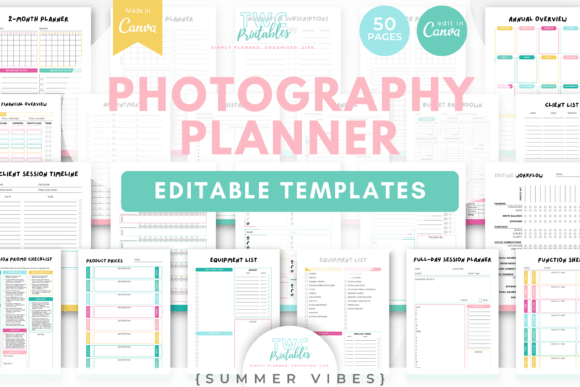
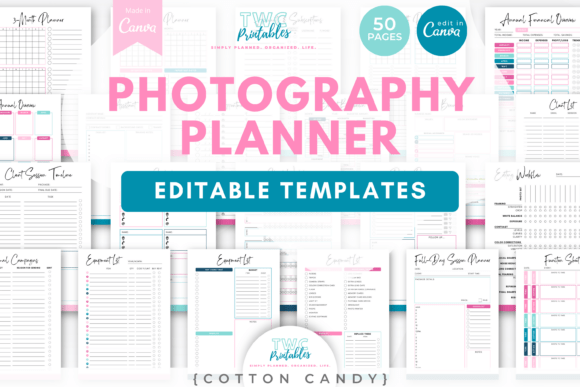
With 50 fully editable templates designed in the Cotton Candy color palette, this collection brings both functionality and visual cohesion to your business planning. The soft, approachable aesthetic works beautifully for creative professionals who want their internal documents to feel as polished as their client-facing materials. Every template is available in both A4 and US Letter sizes, so you can print them out or use them digitally depending on your workflow preferences.
The real strength of the Photography Planner Canva Templates lies in how thoughtfully each page addresses a specific business need. Rather than offering generic planners that require heavy customization, these templates speak directly to the realities of running a photography studio. You'll find dedicated pages for mini-session planning, full-day shoot coordination, location scouting, and client timelines — the kinds of documents that actually save you time when they're ready to use.
Breaking Down the Template Collection
The collection covers every major area of photography business management. Here's how the templates organize themselves across key categories:
Session Planning and Scheduling
At the core of any photography business is the actual work of capturing images. The Photography Planner Canva Templates include multiple session-specific documents that help you prepare thoroughly before every shoot. The photo shot list template lets you outline specific images you want to capture, while the mini-session planner and mini-session day planner break down shorter sessions into manageable time blocks. For longer shoots, the full-day session planner and client session timeline keep everyone aligned on timing and expectations.
The mini-session schedule and mini-session promo checklist are particularly useful if you run seasonal promotions. Instead of scrambling to remember every detail during busy booking periods, you can reference a clear document that outlines your promotional strategy, timeline, and deliverables.
Client and Contact Management
Keeping client information organized is essential for delivering consistent service. The client workflow sheet walks you through each stage of the client experience, from initial inquiry to final delivery. The contacts template gives you a clean place to store vendor relationships, second shooter details, and other professional connections. The appointments sheet rounds out this category by providing a straightforward view of your upcoming bookings.
Business Operations and Finances
This is where many creative professionals struggle, but the Photography Planner Canva Templates make it approachable. The income and expenses sheet helps you track revenue and costs without needing complex accounting software. The budget breakdown template lets you plan for specific projects or seasonal investments. The accounts and subscriptions sheet is a practical addition for anyone managing multiple software tools, insurance policies, or recurring business expenses.
Workflow and Time Management
Consistency in your processes directly impacts how professional your business feels to clients. The editing workflow template helps you establish repeatable steps for post-production, while the marketing workflow keeps your promotional efforts on track. The time log template is valuable for understanding where your hours actually go — insight that can help you price your work more accurately and identify areas where you might delegate or streamline.
For day-to-day planning, you'll find daily, weekly, and monthly planner pages alongside longer-range options including a 2-month, 3-month, 4-month, and annual overview. This range means you can zoom in on today's tasks or zoom out to see the bigger picture of your business trajectory.
Location and Equipment
The location scouting sheet is a thoughtful inclusion for photographers who frequently work on location. You can document lighting conditions, permit requirements, parking details, and backup options for each venue. The equipment list templates — including blank versions and an alternate layout — help you prepare gear for specific sessions and keep track of what you own, what needs maintenance, and what you might want to purchase next.
How to Get the Most from These Templates
The best approach with any planning system is to start simple and build over time. Begin with the templates that address your most pressing pain points. If client communication feels chaotic, start with the client workflow sheet and appointments tracker. If you're losing track of expenses, prioritize the financial templates. Once those become habit, layer in additional pages.
Because these templates live inside Canva, you can customize colors, fonts, and layouts to match your brand identity. The Cotton Candy palette provides a beautiful starting point, but adjusting the design to reflect your own visual style only takes a few clicks. This flexibility means the Photography Planner Canva Templates work whether you're a solo photographer just starting out or an established studio with multiple team members.
Print the pages you need for a physical planner, or keep everything digital for easy access from any device. Either way, having a structured system in place means fewer missed details, smoother sessions, and a more professional experience for every client you work with.
Investing in the Photography Planner Canva Templates is really about investing in the infrastructure that supports your creative work. When the business side runs smoothly, you free up mental space and energy for the photography itself — and that's where the real magic happens.